
SIMPLIS Tutorial

4.2  Reorder the POP Waveforms

At this point, you might want to change the order of the grids. In this example, you will change the order from IL-VOUT-SW to VOUT-IL-SW.

To change the order of the grids, follow these steps:
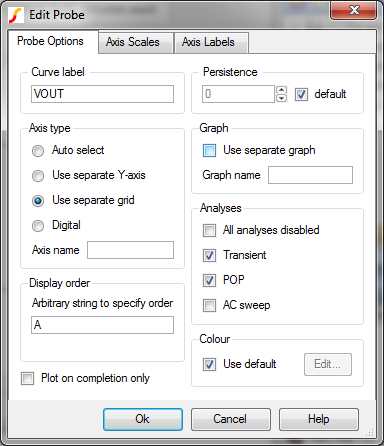
  1. Close the graph window, return to the schematic editor, and double click the VOUT probe.
  2. In the Display order section in the lower left corner below Arbitrary string to specify order, type A in the text box.
    Setting a Display order string determines grid ordering

    Note: The default grid, which is the SW, is always the lowest grid in the graph window.

  3. Click Ok, and then press F9 to rerun the simulation.
    Result: The new graph window should now have the curves in the new order with VOUT above IL.
    POP trigger simulation waveforms with re-ordered grids

Save your schematic

To save your schematic, follow these steps:

  1. Select File ▶ Save As.
  2. Navigate to your working directory where you are saving your schematics.
  3. Name the file 5_my_buck_converter.sxsch.

A schematic saved at this state can be downloaded here: 5_SIMPLIS_tutorial_buck_converter.sxsch.

▲ back to top

© 2015 simplistechnologies.com | All Rights Reserved