DVM Integration
Python files with boilerplate implementations can be created from the Testplan editor; opened from the File Viewer; and edited using the built-in Python editor.
Testplan Editor
To create a new Python script for a pre-/post-/final-process Testplan step, first open a Testplan in the Testplan Editor. Next ensure that the appropriate PreProcess, PostProcess or FinalProcess column exists within the Testplan. Then from a blank cell in the appropriate column and row, right click and choose the menu option Create Python script….
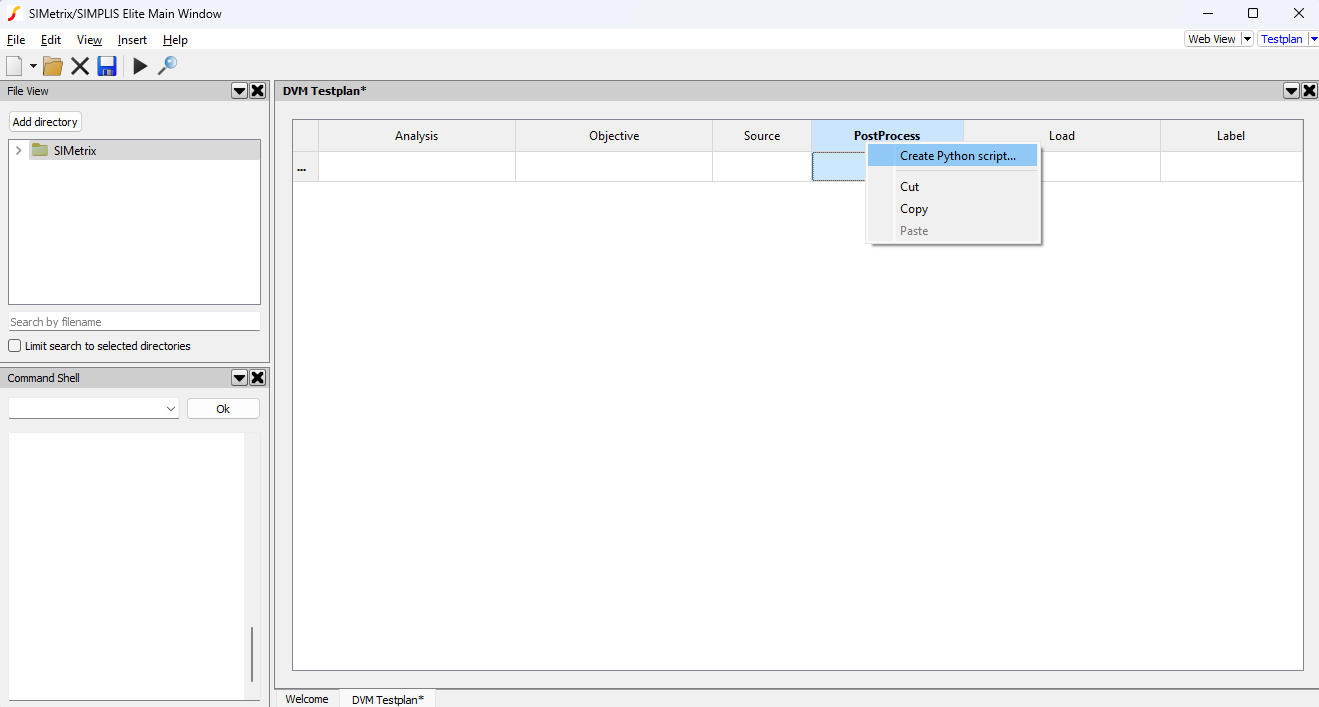
A dialog will appear to select a location to save the Python script being created. Following that, the internal Python editor will open with the new script. The script will be populated with a boilerplate implementation, that is specific to whether a pre-process, post-process or final-process script is being created. Editing the Python script can be performed using either the internal Python Editor or any 3rd party Python IDE.
Existing Python scripts can be opened in the internal editor either by navigating to them in the File Viewer or, if referenced in a DVM Testplan, by right-clicking the cell containing the script name in the DVM Testplan Editor and selecting Open Python.
Post-Process Scripts
The post-process boilerplate provides an empty function postProcess that can be used to provide the required implementation. Internally, the Python script is called with a set of local variables that provide access to Python objects that can be used to access the test being run and the DVM control symbol from the associated schematic.
## DVM Post-Process Script
import simetrix, simetrix.dvm

def postProcess(context : simetrix.dvm.PostTestContext, controlSymbol : simetrix.dvm.ControlSymbol):
    pass ## TODO: implementation

postProcess(locals()["dvm_postProcess_context"], locals()["dvm_postProcess_controlSymbol"])
The context object provides access to the test being currently run. This object can
be used to:
Create scalar values in the test output.
Create specifications in the test output.
Create statistics in the test output.
Create statistical specifications in the test output.
Promote graphs and scalars.
Access the testplan label.
Access the testplan log data.
The controlSymbol object provides access to the control symbol on the schematic. This
object can be used to:
Read property information from the control symbol.
Set property information within the control symbol.
Access information about the schematic the control symbol is contained within, including reading and writing schematic properties.
Access information about other instances within the schematic, including reading and writing their properties.
Final-Process Scripts
The final-process boilerplate does not currently differ significantly from the post-process
boilerplate, and the functionality matches that described in the
Post-Process Scripts section, except the context object is of type
FinalTestContext.
## DVM Final-Process Script
import simetrix, simetrix.dvm

def finalProcess(context : simetrix.dvm.FinalTestContext, controlSymbol : simetrix.dvm.ControlSymbol):
    pass ## TODO: implementation

finalProcess(locals()["dvm_finalProcess_context"], locals()["dvm_finalProcess_controlSymbol"])
Pre-Process Scripts
The pre-process boilerplate script differs from the post-process and final-process scripts,
in that the context object has less functionality
and that a return value must be returned containing a log message to add.
## DVM Pre-Process Script
import simetrix, simetrix.dvm

def preProcess(context : simetrix.dvm.PreTestContext, controlSymbol : simetrix.dvm.ControlSymbol) -> str:
    ##  TODO: implementation
    return "log message"

locals()["dvm_preProcess_result"] = preProcess(locals()["dvm_preProcess_context"], locals()["dvm_preProcess_controlSymbol"])