Installation
Procedure
The following provides the essential steps for installing Python within SIMetrix/SIMPLIS.
Install a supported version of Python. Use either the install manager or a standalone version. It isn’t necessary for Python itself to be on the PATH environment variable, but will do no harm if it is.
Install the SIMetrix/SIMPLIS Python package for the version of SIMetrix/SIMPLIS being used using:
py -m pip install simetrix~=<major>.<minor>.0
Replace
<major>and<minor>with the major and minor version number of SIMetrix/SIMPLIS, for example:py -m pip install simetrix~=9.4.0
Install Pyright using command:
py -m pip install pyright
Install numPy using command:
py -m pip install numpy
Start SIMetrix/SIMPLIS then to check that SIMetrix/SIMPLIS has located your Python installation, run menu File | Options | General… then click on the Python Tab.
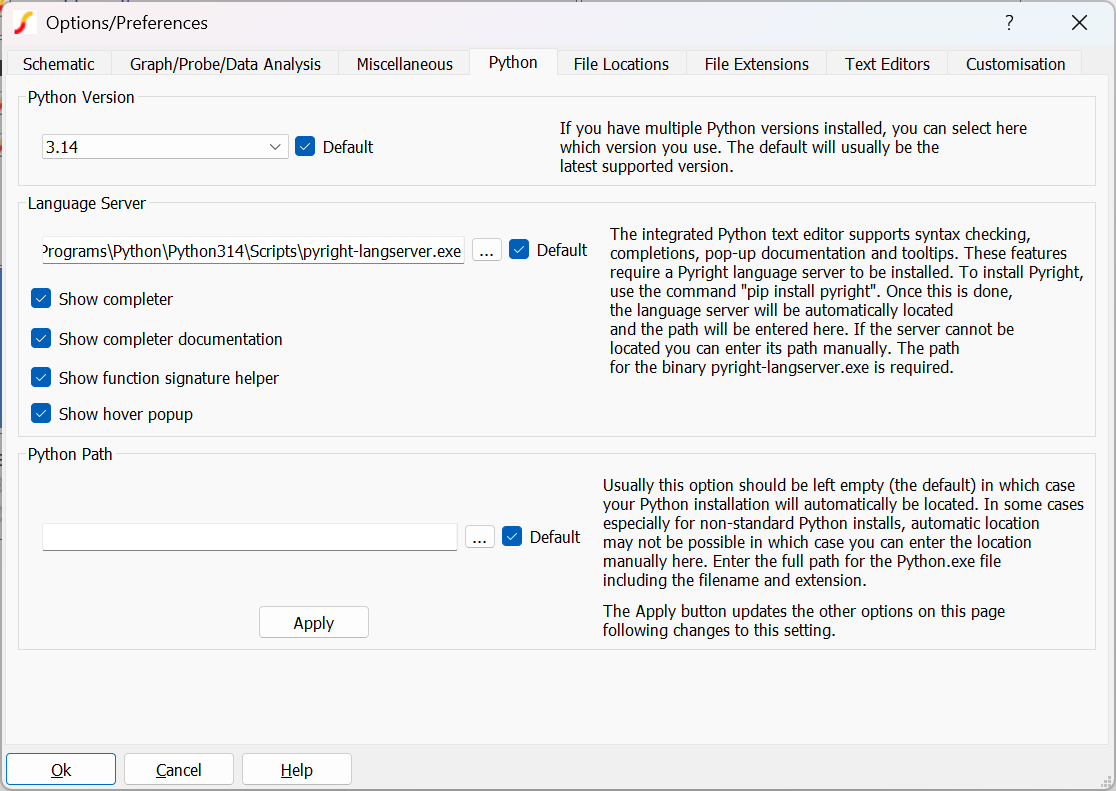
There should be entries for Python Version and Language Server.
If there is no Python Version listed, check that the Python versions installed are supported by SIMetrix/SIMPLIS.
If required, the language server can be located manually although this should not be necessary.
The Python Path entry would usually be left blank but can be used if using a non-standard Python installation. Note that if an entry is made here, the automatic Python installation search mechanism will be disabled.
Notes
numPy
numPy is a library of numerical software for use with Python. Some of the functionality of the SIMetrix/SIMPLIS interface depends on numPy especially the handling of large data vectors so installing this module is essential for the correct functioning of the SIMetrix-Python integration feature.
Pyright Language Server
The integrated Python Editor provides basic syntax highlighting by default. Installing the pyright module significantly increases this functionality by adding features such as completions; pop-up documentation; error checking and highlighting; and tooltips.
Although installing pyright is highly recommended, the SIMetrix Python Integration feature does not depend on it and both the Python editor and Python execution will function correctly without it.
SIMetrix/SIMPLIS Python package
The SIMetrix/SIMPLIS Python package is required alongside the pyright Language server to provide SIMetrix/SIMPLIS interface language details. It is not needed for the SIMetrix-Python functionality itself.
Running on ARM Systems
If you wish to use Python while running SIMetrix on an ARM-based system, be aware that you must install the AMD64 (aka Intel x64) Windows version of Python, not the ARM64 version. The ARM64 version will not function with SIMetrix.